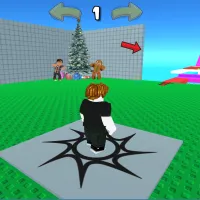
Begin your Mine Gold Launch A Rocket! journey on a resource-rich land. Here, players will control a character moving across the map to search for and mine valuable minerals. There are gold, iron, and rare gems. These resources are the currency you use to upgrade facilities and buy more modern mining tools. Most importantly, they are used to build the rocket parts. The game is divided into two distinct but complementary phases: the underground mining phase and the rocket assembly and launch phase. The final goal is to complete the strongest spaceship, fly the farthest, and discover new planets in the solar system.
MAKING THE DREAM OF SETTING FOOT ON DISTANT PLANETS COME TRUE
For character movement, players will use the arrow keys or the W, A, S, D keys. An interesting point is that the character automatically interacts when standing near a resource. When you move him close to a rock or a gold mine, he will automatically swing his pickaxe to mine. However, to increase mining speed, players can use the left mouse button and click on the target. Function buttons like upgrades, the shop, or the rocket control panel are usually located in the corners of the screen. Players will use the mouse to move the cursor to these icons and left-click to open the menu.
Upgrades
In these menus, deciding which upgrade to prioritize requires careful calculation. When you have enough money, you need to hover the mouse over the pickaxe icon to upgrade mining power. Or you can click the backpack icon to expand storage capacity.
Highlights of Mine Gold Launch A Rocket!
- A perfect balance between action and management strategy.
- Mineral deposits are designed with bright, easily recognizable colors.
- Experience the thrill of managing a mini-NASA space station.
- Pet and costume systems support the resource-gathering process.
How to play
- Movement: WASD or arrow keys.
- Upgrading and accessing the shop: Left mouse click.
- Buying new items: E.
Secret tips
- The most important strategy in the early stage is to focus all resources on upgrading your mining tool.
- Pay attention to random events or treasure chests that appear suddenly on the map.
- Once you've unlocked the miner hiring feature, maximize their capacity.
- Consider upgrading the fuel tank first so the rocket flies longer, then upgrade the engine to increase speed.
FURTHER PLAY